
On-Device AI in Flutter 2026: TensorFlow Lite Tutorial (Image Classifier App) 🤖
On-device AI: no cloud, no internet - just pure privacy and speed with TensorFlow Lite. Building Image Classifier App with Flutter x TensorFlow Lite.

Hello, I'm Samuel, also known as Tech With Sam.
I am passionate about learning and teaching programming, particularly Flutter and Dart at the moment. Please support me by subscribing to my newsletter. Thanks!
Subscribe for weekly tutorials and tips, or DM me to bring your app idea to life.
Questions? Join me on Discord: https://discord.gg/8X7dPYujqm For Business: techwithsam10@gmail.com
If you’ve ever wanted AI in your Flutter app without Gemini API costs, this is it.
Hey guys! It’s Samuel once again. Today, we’re going to be integrating something cool: On-device AI: no cloud, no internet — just pure privacy and speed with TensorFlow Lite. We will use TensorFlow Lite to build an image classifier that recognizes objects in real-time from your camera or gallery.
Why on-device in 2026? Cloud AI is great, but on-device wins for offline apps, privacy (no data sent), and battery life. Flutter’s ecosystem is mature. We have tflite_flutter that handles delegates beautifully now.
We’ll use MobileNet (quantized for mobile), download the .tflite model and labels.txt from TensorFlow Hub.
New project: flutter create ai_classifier.
Create a new assets folder in your project directory: assets/models, and download the mobilenet file and labels.text file and place it inside the assets/models folder.
Next, install dependencies in pubspec.yaml:
dependencies:
  flutter_riverpod: ^3.2.0
  google_fonts: ^7.1.0
  camera: ^0.11.3
  image_picker: ^1.2.1
  tflite_flutter: ^0.12.1
  path_provider: ^2.1.5
  permission_handler: ^12.0.1
  path: ^1.9.1
  image: ^4.7.2

assets:
  - assets/models/mobilenet_v1.tflite
  - assets/models/labels.txt
TFLite helper: lib/providers/classifier_provider.dart
import ‘package:flutter_riverpod/flutter_riverpod.dart’;
import ‘../services/tflite_service.dart’;

final tfliteServiceProvider = Provider<TfliteService>((ref) {
  return TfliteService();
});

final classifierInitializedProvider = FutureProvider<void>((ref) async {
  final service = ref.watch(tfliteServiceProvider);
  await service.init();
});
Tflite Service: lib/services/tflite_service.dart
import ‘package:tflite_flutter/tflite_flutter.dart’;
import ‘package:image/image.dart’ as img;

class TfliteService {
  late Interpreter _interpreter;
  late List<String> _labels;

  Future<void> loadModel() async {
    _interpreter = await Interpreter.fromAsset(’mobilenet_v2.tflite’);
    final labelsData = await rootBundle.loadString(’assets/labels.txt’);
    _labels = labelsData.split(’\n’);
  }

  Future<List<Map<String, dynamic>>> predict(img.Image image) async {
    // Preprocess: Resize to 224x224, normalize
    final input = _preprocess(image);

    final output = List.filled(1 * 1001, 0.0).reshape([1, 1001]);

    _interpreter.run(input, output);

    // Postprocess: Top 5 labels
    final List<Map<String, dynamic>> results = [];
    final outputList = output[0] as List<double>;
    for (int i = 0; i < outputList.length; i++) {
      results.add({’index’: i, ‘confidence’: outputList[i]});
    }
    results.sort((a, b) => b[’confidence’].compareTo(a[’confidence’]));
    return results.take(5).map((r) => {
      ‘label’: _labels[r[’index’] as int],
      ‘confidence’: (r[’confidence’] as double * 100).toStringAsFixed(1),
    }).toList();
  }

  // Full preprocess function (resize, normalize to [0,1] or [-1,1] per model)
  // Use img package or custom
}
UI: Home screen with ImagePicker button.
Pick image → decode → run predict → display ListView of labels/confidence.
Add loading spinner + error handling.
 File? _selectedImage;
  List<Map<String, dynamic>>? _results;
  bool _isCameraMode = false;
  final ImagePicker _picker = ImagePicker();

  Future<void> _pickImage(ImageSource source) async {
    final XFile? image = await _picker.pickImage(source: source);
    if (image != null) {
      setState(() {
        _selectedImage = File(image.path);
        _results = null;
      });
      _classifyImage(_selectedImage!);
    }
  }

  Future<void> _classifyImage(File file) async {
    final service = ref.read(tfliteServiceProvider);
    final results = await service.classifyImage(file);
    setState(() {
      _results = results;
    });
  }
That’s all! Demo on emulator/real device, pick a photo, see instant labels, and see how it works.
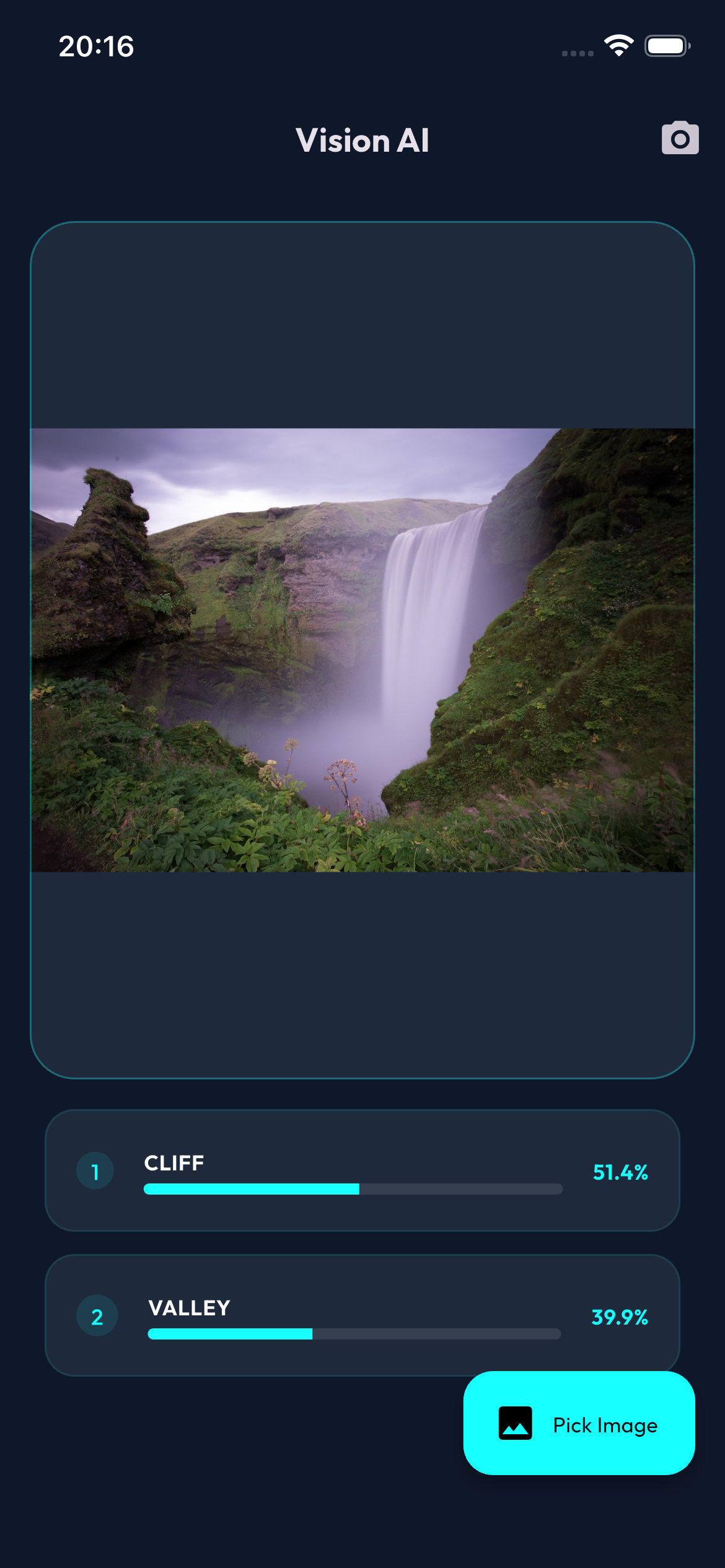
Full Source Code 👇 — Show some ❤️ by starring ⭐ the repo and follow me 😄!
https://github.com/techwithsam/vision_ai
I hope you’ve learn something incredible. Press that follow button if you’re not following me yet. Also, make sure to subscribe to the newsletter so you’re notified when I publish a new article. Kindly press the clap button as many times as you want if you enjoy it, and feel free to ask a question.
🔗 Let’s Connect 🔗 → Github | Twitter | Youtube | LinkedIn.
Join my Community 👨💻👨💻 on Discord.
Subscribe to my YouTube channel | and also to the Medium newsletter in the input box above👆 or below👇.
Happy Building! 🥰👨💻


